A custom SKILL.md that turns Claude into a rigorous APA 7th edition proofreader, with an interactive dashboard, inline corrections, and sidebar explanations that outperform every existing tool.
If you have ever submitted an academic paper, you know the anxiety.
You have spent weeks on the research, the argument is tight, and the data supports your conclusions. Then the journal sends it back, not for the science, but for the formatting.
A missing serial comma. An “et al.” without the period after “al.” A p-value with a leading zero it should not have.
APA style has hundreds of rules. No single person holds them all in working memory.
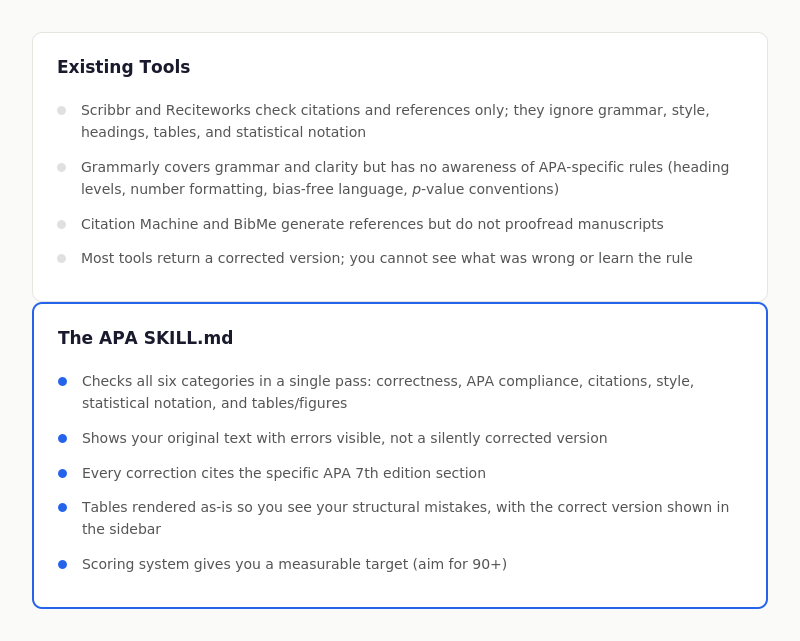
The existing tools that claim to help (Scribbr, Reciteworks, Citation Machine, Grammarly) each cover a narrow slice: citations only, grammar only, or surface-level formatting.
None of them check your entire manuscript against the full APA 7th edition rule set, in context, with explanations and corrections you can act on.
So I built one.
It runs inside Claude using a custom SKILL.md file, and it produces something I had not seen before:
a Grammarly-style interactive report that scores your paper, colour-codes every issue by category, and shows corrections in a sidebar alongside your original text.
What It Actually Looks Like
When you upload a paper and ask Claude to proofread it using the APA skill, it produces an HTML artifact with two panels.
Here is the dashboard and editing interface:
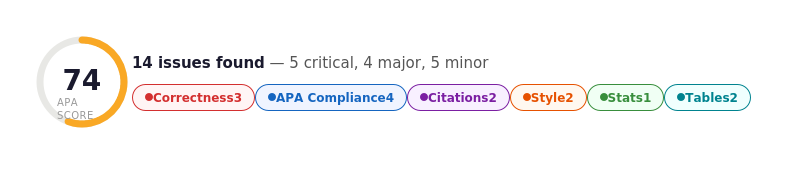
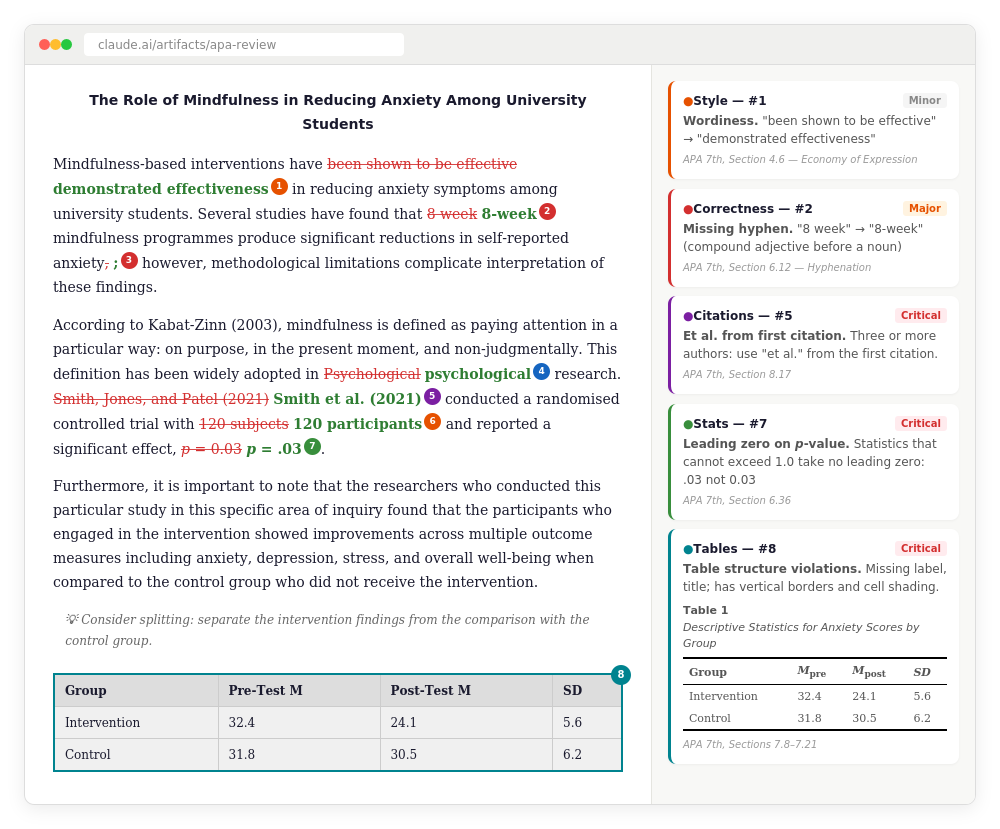
Every issue in the document gets a numbered badge, colour-coded by category.
Clicking a badge scrolls to its explanation card in the sidebar.
Clicking a sidebar card scrolls back to the issue in your text.
The category chips in the dashboard strip act as filters, so you can focus on citations only, or statistical notation only, working through one category at a time.
Why Existing Tools Fall Short
I reviewed every major APA checking tool before building this. The landscape splits into two camps: citation-only checkers and general grammar tools.
Neither covers the full picture.
How I Built It
The skill was not assembled from blog posts or secondary sources.
The rule set comes directly from the Publication Manual of the American Psychological Association, Seventh Edition (2020), cross-referenced with APA’s own instructional aids: the Student Paper Checklist, the Professional Paper Checklist, and the Style and Grammar Guidelines published at apastyle.apa.org.
I also consulted the Purdue OWL APA guide for common student error patterns, which helped me calibrate the scoring weights.
The build process followed three stages:
- Encoding the rules. I worked through every chapter of the Publication Manual and distilled the actionable rules into structured categories: grammar, formatting, citations, references, tables, figures, statistics. Each rule got a section reference so Claude can cite it in the sidebar cards. This is the core of the SKILL.md file: approximately 300 lines of precise, structured APA guidance.
- Designing the output format. I studied Grammarly’s interface: the overall score gauge, the four colour-coded categories (Correctness, Clarity, Engagement, Delivery), and the sidebar suggestion cards. I adapted this structure for APA, replacing Grammarly’s categories with six APA-specific ones and adding table/figure previews. The two-panel layout (document left, sidebar right) was inspired by how professional editors use track changes and comment threads.
- Iterating the scoring model. I calibrated severity levels (critical, major, minor) and point deductions to reflect how journal reviewers actually weight different errors. A missing reference (critical, -3 points) matters far more than a passive voice construction (minor, -1 point). The scoring model means you get a concrete number to track across revisions.
What the SKILL.md Covers
The skill file has two main sections.
The first encodes the APA rules themselves: voice and clarity, grammar (tense, agreement, pronouns), bias-free language, punctuation, numbers, abbreviations, paper formatting (title page, abstract, headings, block quotations), table and figure formatting, in-text citations, reference list construction, and statistical reporting.
Every rule is specific and actionable, not vague guidance.
The second section defines the output format. It instructs Claude to produce an HTML artifact with the dashboard strip, two-panel layout, inline error marking with coloured badges, and sidebar correction cards.
It specifies how to handle tables (render the user’s original, show the corrected version in the sidebar), how to handle long sentences (inline splitting suggestions), and how to calculate the score.
Crucially, the skill tells Claude what not to do.
It must never silently rewrite the passage. It must never add content or reorganise sections.
It must never flag stylistic preferences that fall outside APA rules.
The output is diagnostic, not corrective: it shows you what is wrong and why, so you can fix it yourself and learn the rules in the process.
Who This Is For
Students Writing Dissertations and Theses
APA formatting errors are one of the most common reasons for revision requests.
A tool that catches these before submission saves weeks of back-and-forth with your supervisor. The scoring system also gives you a concrete benchmark: submit when your score is above 90.
Researchers Preparing Journal Submissions
Journals that follow APA style (and there are hundreds) will desk-reject manuscripts with persistent formatting errors.
Running your paper through this check before submission catches the errors that are easy to miss after you have read your own text a dozen times.
Academic Editors and Supervisors
If you review student work, this tool provides structured, consistent feedback.
Instead of marking up the same serial comma error twenty times, the dashboard shows the student their pattern of errors so they can fix them systematically.
Psychology Educators
The sidebar cards with APA section references turn the proofreading report into a teaching tool.
Students do not just see the correction; they see the rule, which builds their APA literacy over time.
Using the Skill
The SKILL.md file lives in Claude’s skill system.
To upload skills to Claude.ai, navigate to Settings > Customize > Skills and click the “+” button to upload your
SKILL.mdfile. the skill will now sync will desktop and mobile Claude applications.
To use it, upload your manuscript (Word, PDF, or pasted text) and ask Claude to proofread it for APA style.
Claude reads the skill, applies the rules, and generates the HTML artifact with the dashboard and two-panel layout.
You can work through the issues category by category, fix them in your own document, and re-upload for another pass. The score gives you a clear signal of progress: first pass might be 68, second pass 82, third pass 94.
The goal is not to automate APA formatting. It is to give you a rigorous second pair of eyes that knows the Publication Manual inside out, explains every flag, and lets you make the corrections yourself.
If you are an academic, student, or editor who works with APA style, I would be interested to hear what you think. You can find me at saulmcleod.com or on Simply Psychology.