If you’ve ever conducted a systematic review, you know the gold standard for scientific rigor: dual data extraction.
To minimize errors and bias, guidelines require two independent reviewers to read the same dense PDFs, extract the data, and compare their findings. Finding a colleague with the time to do this is often the biggest bottleneck in the entire process.
But what if you could recruit an incredibly fast, highly accurate “Second Reviewer” for less than the cost of a cup of coffee?
Enter EvidenceEngine, my new AI-driven script designed to perform parallel data extraction for systematic reviews.
Whether your studies are looking at clinical interventions (PICO) or observational exposures (PECO), this tool is designed to serve as your independent extraction partner while strictly maintaining Cochrane compliance.
Here is a breakdown of how it works, how it performed in recent testing, and how you can use it for your next review.
1. The Methodology: Cochrane Compliance (Section 5.5.9)
As academics, our primary concern is rigorous scientific methodology. We are not replacing human extraction; we are augmenting it.
EvidenceEngine is built to comply strictly with the dual data extraction standards outlined in the Cochrane Handbook (Section 5.5.9):
- Reviewer 1 (You): You manually read the PDFs and extract your data independently.
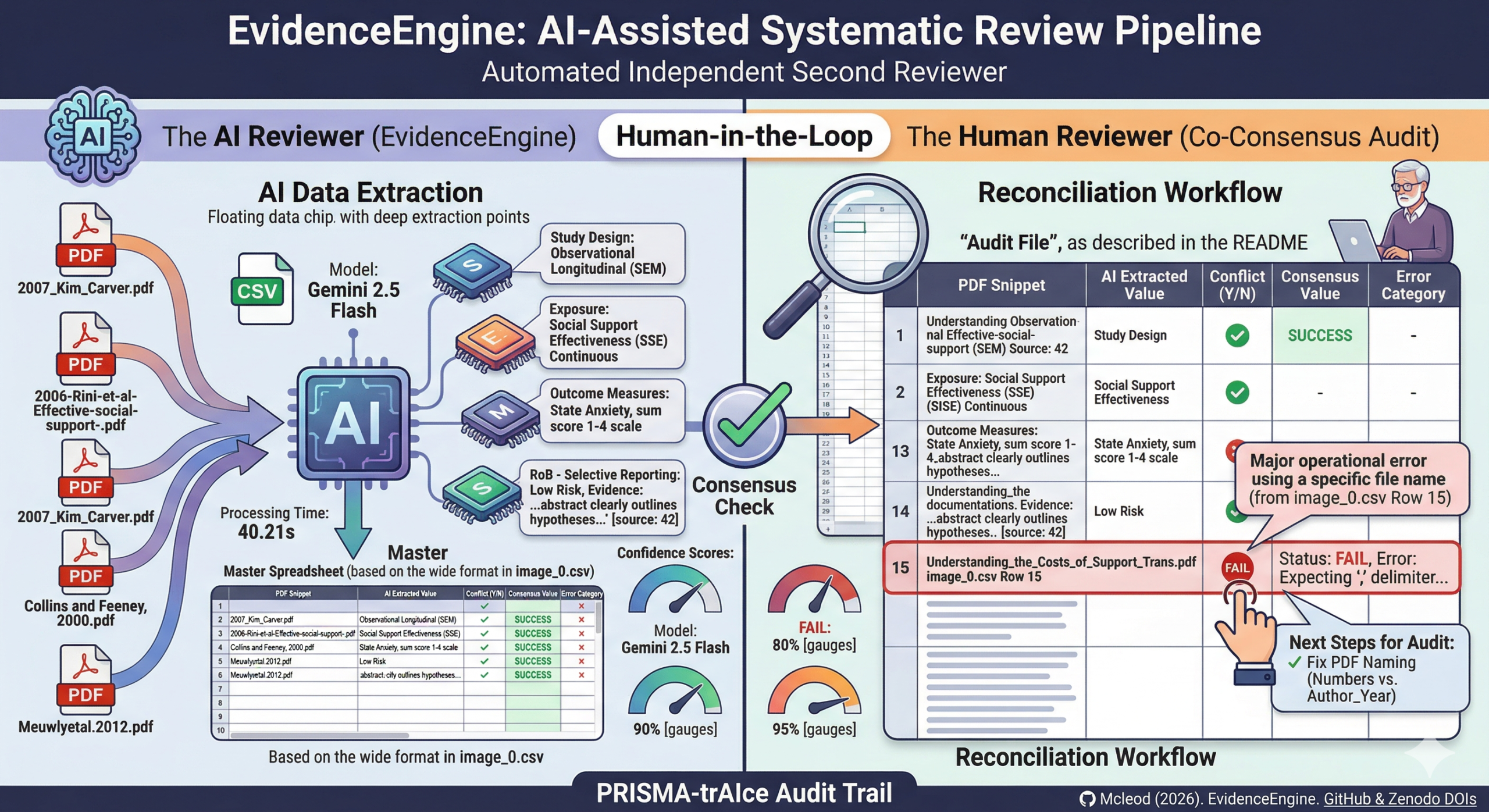
- Reviewer 2 (The AI): EvidenceEngine simultaneously reads the PDFs, categorizes the study design, and performs its own independent data extraction.
- The Consensus: You compare your human-extracted data against the AI-extracted data to check for reliability and establish a final, verified “Consensus Value.”
This parallel workflow guarantees that the final dataset maintains strict scientific integrity without requiring a second human to sacrifice hundreds of hours.
2. High Accuracy meets Low Cost
For my initial pilot reliability check, I tested EvidenceEngine against the summary tables of a previously published systematic review (McLeod et al., 2020).
Using Google’s Gemini 2.5 Flash model, the AI successfully extracted key variables—like Sample Size and Study Design—with 100% agreement with the human-published data in the tested batch.
Even better is the cost-efficiency.
Processing 36 full-text studies cost approximately £0.60 (60p) in total.
However, EvidenceEngine goes far beyond basic demographics. The pipeline is designed to handle complex methodological evaluations, including:
- Risk of Bias (RoB) Assessments: The AI evaluates Cochrane Risk of Bias domains (such as Selection, Attrition, and Reporting bias) and—crucially—pulls the exact quotes from the text as evidence for its judgment.
- Confidence Scores: For every paper, the AI generates a
Confidence_Score(averaging 85–95% in pilot tests). This gives human reviewers a brilliant metric to quickly spot which papers the AI found difficult, allowing you to focus your auditing energy exactly where it is needed.
(Note: I specifically designed the prompt to exclude extracting “effect sizes” for now. Research shows that language models often struggle to find these in dense tables. If your review strictly requires effect size extraction, I recommend swapping the engine to Gemini 3.0).
3. The Verification Workflow: Measuring Reliability
To make the consensus process as painless as possible, EvidenceEngine automatically generates three neat output files per run: a Master Dataset (Excel), a technical Extraction Log, and a vertical Audit File (CSV).
You will use the Audit File to quickly compare the AI’s extractions side-by-side with your own manual data. The reconciliation workflow is simple:
- Compare: Cross-reference your manually extracted data with the AI’s extracted dataset.
- Conflict Adjudication: In the audit file, if you and the AI agree, mark “Y” (Yes). If there is a disagreement, mark “N” (No).
- Error Categorization: To maintain a rigorous audit trail, you will tag any AI failures using built-in error categories: Numerical (wrong numbers), Mismatch (correct data in the wrong category), or Confabulation (the AI “made up” a value). You then establish the correct data in the
Consensus_Valuecolumn. - Reporting: Once the audit is complete, we calculate an F1 Score (Accuracy %) based on your Y/N marks to report transparently in the final manuscript.
4. Next Steps & A Crucial Setup Tip
If you are ready to try EvidenceEngine as your second reviewer, there is one critical step you must take before running the script: Rename your PDFs.
During pilot testing, we discovered that downloading publisher PDFs often results in files named with random strings of numbers (e.g., 10928374.pdf).
For the Audit File to work perfectly, you need to know exactly which paper the AI is extracting data from so you can match it to your own spreadsheet.
Before running the script, rename all your PDFs to a recognizable format, such as Author_Year.pdf (e.g., Smith_2023.pdf).
This ensures the data in the audit spreadsheet is perfectly matched to the correct study, saving you massive amounts of cross-referencing time later.
5. Built for Open Science Standards
Transparency is at the heart of modern research. EvidenceEngine’s workflow is specifically built to satisfy PRISMA-trAIce requirements for AI-assisted systematic reviews.
Furthermore, the finalized Audit File (saved as a CSV) is designed to be uploaded directly to your journal submission as Supplementary Data.
This serves as transparent proof of your rigorous dual-extraction and consensus process. The code and data are actively archived on GitHub and Zenodo, ensuring a permanent DOI for proper citation.
Ready to get started? You can access the open-source script, read the setup documentation, and see the exact extraction prompts at the EvidenceEngine GitHub Repository.
Citation
Mcleod, S. (2026). EvidenceEngine: AI-Assisted Systematic Review Pipeline for Data Extraction (1.0.0). Zenodo. https://doi.org/10.5281/zenodo.18165158